🔍 RAGify under the Scope
As we already presented in the Introduction, RAGify is a powerful tool that enhances the way you interact with PDF documents. It combines the strengths of retrieval systems and generative models to provide more informed, accurate, and contextually relevant outputs.
Install Dependencies
Install first Ollama. server in your machine.
In a new cmd run the commands bellow to install some models.
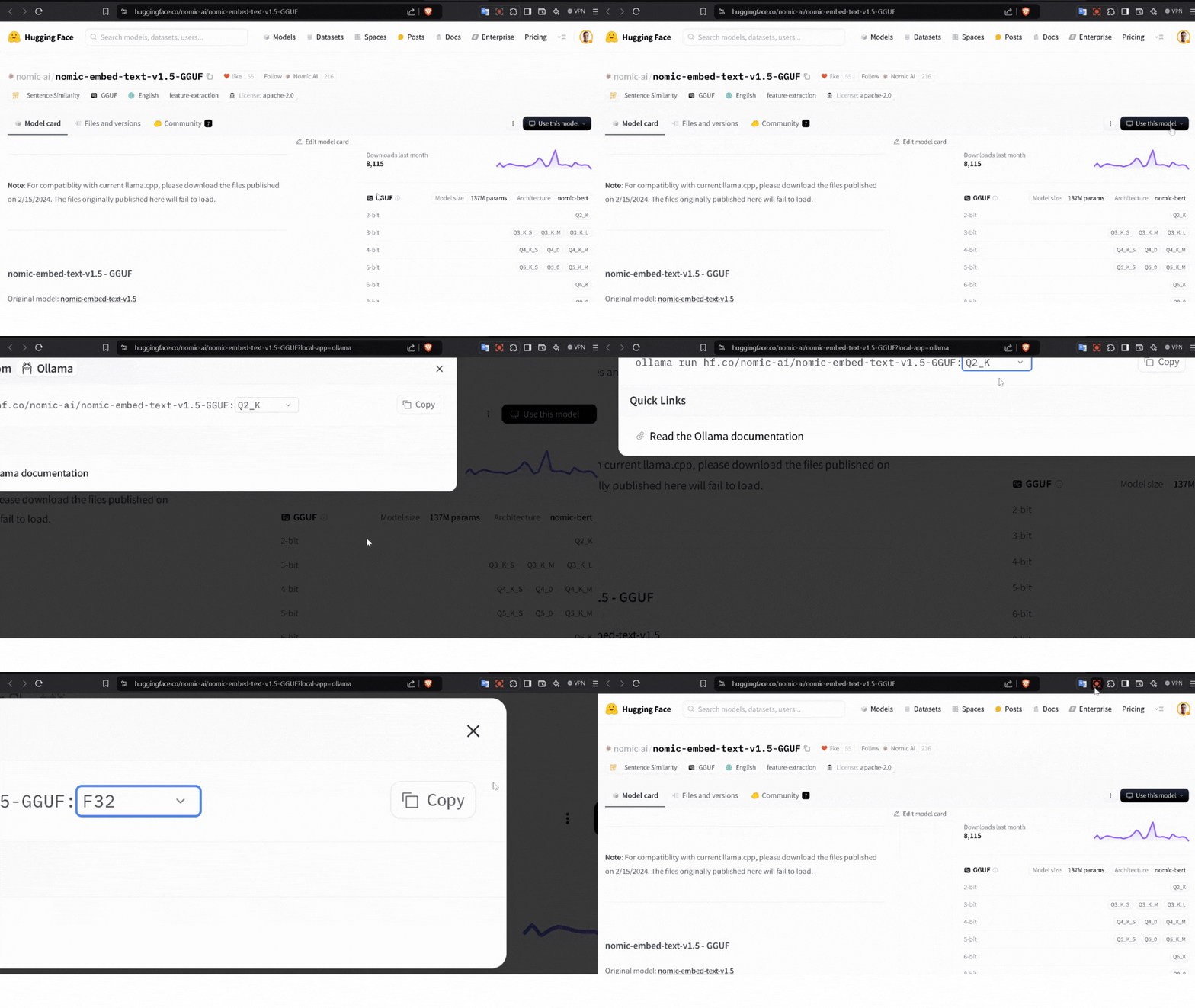
ollama pull hf.co/nomic-ai/nomic-embed-text-v1.5-GGUF:F32
ollama pull llama3.2:3b
ollama pull llama3.1:8b
ollama pull qwen:7b
Then in a new Conda env or venv install some python libraries with :
pip install -r requirements.txt
Implimenation of RAGify
utilitis.py
Countain usefull functions for non-arabic files.
chromadb.api.client.SharedSystemClient.clear_system_cache()
# This line for avoiding some errors when using ChromaDB with Streamlit

URL = "http://localhost:11434"
persist_directory="CHROMA_2"


embed_model = OllamaEmbeddings(
    model="hf.co/nomic-ai/nomic-embed-text-v1.5-GGUF:F32",
    base_url=URL,
    show_progress =True
)
The code clears the system cache of the ChromaDB client and sets up the local server URL and persistence directory. It then initializes the OllamaEmbeddings model using the nomic-embed-text-v1.5-GGUF model for text embeddings, with progress display enabled.
Extract_pdf_content Extracts text from all pages of a PDF file.
def Extract_pdf_content(pdf_file):
    """
    Extracts the content of each page in a PDF file and returns a list of pages.
    """
    reader = PdfReader(pdf_file)
    pages = []
    for page in reader.pages:
        pages.append(page.extract_text())
    return pages
Description:
Reads the PDF file and extracts text content from each page.
Returns a list of text strings, where each string corresponds to a page.
Proccess_Files Reads and processes multiple PDF files, updating the progress in a Streamlit app.
def Proccess_Files(Files):
    if Files :
        st.title("📄 Reading Files ...")
        progress_percentage = 0
        Documents = []

        total_files = len(Files)
        progress_bar = st.progress(0)

        for file_index, file in enumerate(Files):
            Pages_Contents = Extract_pdf_content(file)
            file_name = file.name
            for index, Page in enumerate(Pages_Contents):
                document = Document(
                    page_content=Page,
                    metadata={"source": file_name, "PageNum": index + 1}
                )
                Documents.append(document)
            progress_percentage = int(((file_index + 1) / total_files) * 100)
            progress_bar.progress(progress_percentage, text=f"{progress_percentage} %")

        if progress_percentage == 100:
            st.success("✅ Files processing completed!")
            st.session_state['Documents'] = Documents
        return Documents
    return None
Description:
Uses the Extract_pdf_content function to process PDFs.
Updates progress dynamically in a Streamlit UI.
Stores processed documents in st.session_state for later use.
Chunking Splits document text into manageable chunks for processing.
def Chunking(documents):
    if documents :
        st.title("✂️ Chunking documents ...")
        text_splitter = RecursiveCharacterTextSplitter(chunk_size=2000,chunk_overlap=600)
        Chunks = text_splitter.split_documents(documents)
        st.write("#### Number of Chunks is :",len(Chunks))
        if Chunks :
            st.success("✅ Chunking completed!")
            st.session_state['Chunks'] = Chunks
        return Chunks
    return None
Description:
Uses RecursiveCharacterTextSplitter to divide text into smaller chunks of size 2000 with an overlap of 600 characters.
Displays progress and stores the chunks in st.session_state.
Create_Database Creates a Chroma vector database from text chunks.
def Create_Database(Chunks):
    if Chunks :
        st.title("🗄️ Creating ChromaDB ...")
        vector_store = Chroma.from_documents(Chunks, embed_model, persist_directory=persist_directory)
        st.success("✅ ChromaDB is ready!")
        st.session_state['Vector_store'] = vector_store
Description:
Converts document chunks into vector representations using embeddings and stores them in ChromaDB.
Stores the vector database in st.session_state.
Retrieve Retrieves the most relevant chunks for a given question.
def Retrieve(Question):
    db = Chroma(persist_directory=persist_directory, embedding_function=embed_model)
    results = db.similarity_search_with_relevance_scores(Question, k=5)
    context_text = "\n\n---\n\n".join([chunk.page_content for chunk, _score in results])
    prompt_template = ChatPromptTemplate.from_template(PROMPT_TEMPLATE)
    prompt = prompt_template.format(context=context_text, question=Question)
    return prompt, context_text
Description:
Searches the ChromaDB for the top 5 relevant chunks for the input question.
Formats the results into a prompt template for the language model.
Run_Pipeline Runs the retrieval and generation pipeline for a question.
def Run_Pipeline(question, LLM_Name):
    prompt, _ = Retrieve(question)
    st.write("### 🧾 Prompt")
    st.text_area(label="", value=prompt, height=200)

    llm = Ollama(model=LLM_Name, base_url=URL)
    response = llm.invoke(prompt)
    return response
Description:
Combines the retrieval step with the LLM to generate answers for a user query.
Displays the generated prompt and retrieves the final response.
RunLLM Runs the LLM directly with a user-provided question.
def RunLLM(question, LLM_Name):
    llm = Ollama(model=LLM_Name, base_url=URL)
    response = llm.invoke(question)
    return response
Description:
Directly queries the LLM without retrieval for a simpler use case.
utilitis1.py
For arabic files.
chromadb.api.client.SharedSystemClient.clear_system_cache()
# This line for avoiding some errors when using ChromaDB with Streamlit

embedding_model = HuggingFaceEmbeddings(model_name="sentence-transformers/paraphrase-multilingual-mpnet-base-v2")
URL = "http://localhost:11434"
persist_directory="CHROMA_Arabic"
This line initializes the embedding model using the HuggingFace paraphrase-multilingual-mpnet-base-v2 model for multilingual text embeddings, sets the local server URL, and defines the directory for storing the Chroma database.
Extract_pdf_content_1 Extracts text from all pages of an Arabic PDF file.
def Extract_pdf_content_1(pdf_file):
    """
    Extracts the content of each page in a PDF file and returns a list of pages.
    """
    reader = PdfReader(pdf_file)
    pages = []
    for page in reader.pages:
        pages.append(page.extract_text())
    return pages
Description:
Reads the Arabic PDF file and extracts text content from each page.
Returns a list of strings, each representing the content of a single page.
Proccess_Files_1 Processes multiple Arabic PDF files and tracks progress in Streamlit.
def Proccess_Files_1(Files):
    if Files :
        st.title("📄 قراءة الملفات ...")
        progress_percentage = 0
        Documents = []

        total_files = len(Files)
        progress_bar = st.progress(0)

        for file_index, file in enumerate(Files):
            Pages_Contents = Extract_pdf_content_1(file)
            file_name = file.name
            for index, Page in enumerate(Pages_Contents):
                document = Document(
                    page_content=Page,
                    metadata={"source": file_name, "PageNum": index + 1}
                )
                Documents.append(document)
            progress_percentage = int(((file_index + 1) / total_files) * 100)
            progress_bar.progress(progress_percentage, text=f"{progress_percentage} %")

        if progress_percentage == 100:
            st.success("✅ تم الانتهاء من معالجة الملفات!")
            st.session_state['Documents_1'] = Documents

        print(Documents)
        return Documents
Description:
Uses Extract_pdf_content_1 to extract text from each PDF.
Displays a progress bar and stores processed documents in st.session_state.
Chunking_1 Splits Arabic document text into smaller chunks for better processing.
def Chunking_1(documents):
    if documents :
        st.title("✂️ تقسيم الوثائق ...")
        text_splitter = RecursiveCharacterTextSplitter(chunk_size=2000, chunk_overlap=600)
        Chunks = text_splitter.split_documents(documents)
        st.write("#### Number of Chunks is :", len(Chunks))
        if Chunks :
            st.success("✅ تم تقسيم الوثائق بنجاح!")
            st.session_state['Chunks_1'] = Chunks
        return Chunks
    return None
Description:
Uses RecursiveCharacterTextSplitter to split the Arabic document text into chunks of size 2000 with an overlap of 600 characters.
Stores the chunks in st.session_state.
Create_Database_1 Creates a Chroma vector database for Arabic document chunks.
def Create_Database_1(Chunks):
    if Chunks :
       st.title("🗄️ إنشاء قاعدة بيانات ChromaDB ...")
       vector_store = Chroma.from_documents(Chunks, embedding_model, persist_directory=persist_directory)
       st.success("✅ قاعدة بيانات  جاهزة!")
       st.session_state['Vector_store_1'] = vector_store
Description:
Converts document chunks into vector embeddings using the HuggingFaceEmbeddings model.
Stores these embeddings in a ChromaDB instance.
Retrieve_1 Retrieves the most relevant Arabic text chunks for a given question.
def Retrieve_1(Question):
    db = Chroma(persist_directory=persist_directory, embedding_function=embedding_model)
    results = db.similarity_search_with_relevance_scores(Question, k=5)
    context_text = "\n\n---\n\n".join([chunk.page_content for chunk, _score in results])
    prompt_template = ChatPromptTemplate.from_template(PROMPT_TEMPLATE)
    prompt = prompt_template.format(context=context_text, question=Question)
    return prompt, context_text
Description:
Searches the ChromaDB for the top 5 relevant chunks based on the input question.
Formats the results into a custom Arabic prompt template for further processing.
Run_Pipeline_1 Runs the entire pipeline to retrieve and answer a question using an Arabic LLM.
def Run_Pipeline_1(question, LLM_Name):
    prompt, _ = Retrieve_1(question)
    st.write("### 🧾 الطلب")
    st.text_area(label="", value=prompt, height=200)

    llm = Ollama(model=LLM_Name, base_url=URL)
    response = llm.invoke(prompt)
    return response
Description:
Combines the retrieval step with the LLM for generating responses to user queries.
Displays the generated prompt and retrieves the final response.
RAGify Demo Video
Here is a video of the RAGify pipeline in action: